Agentic Transformation of Core Applications: A Practical Playbook
Taking a Tier 1 application into the agentic era is not a single project. It is a program that has to balance quick wins against long-term strategy, ambition against a very low tolerance for failure, and speed against the trust of the people who depend on the system.
Why core applications are different
At this point in time, most enterprises have some sort of chatbots and knowledge management (RAG) applications running in production. Most leaders I talk to have also realized that AI transformation of Tier 1 core applications is not the same thing. These systems run the business, and there is little to no room for mistakes. Taking them into an agentic world is the hardest transformation enterprises can attempt, and often the most valuable one, with the greatest return on investment.
This is the playbook I follow. It builds on my other article about AI strategy. This playbook accounts for a sequence of decisions that drive the transformation holistically. It is not a tool list or a vendor pitch. Like any playbook that helps teams win, it is built on a sequence of decisions that, in my experience, allow teams to look at things holistically, find a common language for everyone, and make decisions that help with short-term gains while keeping an eye on the overall transformation.
Five realities that shape everything
Before any architecture diagram, recognize the constraints that make core applications unlike anything else in the organization.
From book of record to active system. In every core application that enterprises use, work is done outside the application, and the results are recorded in the application. Those recorded data points are then used to drive downstream systems and analytics. Agents provide an opportunity to turn them into systems that recommend, draft, decide and trigger while continuing to record the results of human action. True transformation only comes from changing these passive systems into active systems.
Very low tolerance for failure. Tier 1 systems feed regulatory, compliance and financial decisions. One mistake out of ten actions (even a hundred) can be catastrophic. Agentic transformation of these systems has to account for reliability and rollback. A high level of attention needs to go to the things the agent should never be allowed to do, with special attention paid to evaluations, rollover and circuit breakers.
Downstream impact. These systems feed regulators, auditors, finance and partner systems. A small behavioral change in one place can ripple into regulatory and compliance obligations far away from where the change was made. As much as possible, we should try to isolate the old system from the impacts of the transformation to allow for extended periods of evaluations, dark releases, planned pilots and deliberate rollouts.
Quick wins versus long-term strategy. You need both. Quick wins prove value and buy patience. No CFO will fund a three-year transformation journey that has no return in the first year. It is critical to find those quick wins while keeping the big transformation in mind. What it really comes down to is avoiding throwaway work and balancing speed with users' tolerance for transformation.
User trust. The people who run these systems every day really know the importance of these applications and the impact of every mistake. They are the first ones to point out why a small mistake will turn into a lawsuit, a regulatory issue, etc. If the first thing they see is an agent that gets things wrong, they might not be willing to come along for the ride.
These five pull in different directions. Speed fights risk, and ambition fights trust. The rest of this playbook is, in effect, a way of balancing them on purpose rather than by accident.
The playbook is built assuming you are not doing a knife-switch transformation (who does that in this day and age anyway?). It assumes you will keep the old system as-is during the period of transformation and slowly move parts and pieces into the new system. At the end of the transformation, the users will move to the new system, and the old system will be retired. This plan ensures you are not tackling downstream dependencies concurrently with the transformation. It also assumes a need for a mechanism to keep data synced between the old and new systems until the sunset. In general, with slight modifications, the playbook will hold even if your assumptions are different.
Step 1: Start with strategy and alignment
Do not start with the system. Start with the business of that system. The first thing that must happen is that the business and technology leaders agree on why the transformation is being done, what outcomes matter, how much risk the organization is willing to carry, and how things will be worked out when something goes wrong.
In practice, that means a small number of explicit agreements: the business outcomes the program is accountable for, the executive sponsors on both the business and technology sides, the risk appetite, and the principles that will govern every later decision. Risk, compliance and legal belong in this conversation from the beginning, not as reviewers at the end.
As I point out in my article about strategy, not spending the time to anchor the teams on these things will be catastrophic in later phases. Teams will argue about scope in the middle of a build, a compliance concern will surface the week before launch, and a quick win will be mistaken for the strategy. Get alignment first, write it down, and refer back to it often. Only then approach the system.
Prepare to revisit these periodically and adjust over time.
Step 2: Two lanes, three phases
Once you have created initial alignment, approach the system by breaking it into two lanes.
Lane 1: User experience augmentation. This is about how people interact with the application: finding information, understanding a record, drafting a response and navigating a complex screen. This is what the users see and experience.
Lane 2: Workflow optimization. This is about how work moves through the system: routing, decisions, handoffs and the steps that are candidates for automation. The users never see this; they see the outcomes of Lane 2's surrogacy on Lane 1.
Creating these lanes has several distinct benefits.
- Separates the risks. UX changes are less risky than agentic changes.
- Allows for quick feedback. Agentic builds have a longer runway than UI changes because of data, evals requirements, etc. The decoupling allows you to mock the agent's response and get feedback from users faster. That saves so much time by avoiding building agents that users never want.
- Finding quick wins to fund the journey. Sometimes an agent in the background can get you a quick win in the old systems. Other times, the UI change will get you that quick win. Keeping the two tracks helps you find your wins as you need them.
- Managed rollout. I cannot stress enough the importance of user adoption. Giving users time to get familiar with the new UI and experience the agentic workflows is critical to the success of the transformation.
Three phases
Plan the integration of these two lanes in three phases, starting in the first lane and bringing the effects of the second into it. The three phases are:
Surface. The AI agent starts interacting with the user experience, bringing in the workflow optimization while enhancing the user experience. The agent processes the next best action and surfaces it for humans to review. This is the trust-building phase. The teams working on the transformation can build trust in the plan and the technology. The users can learn about the behavior of AI agents. For example, this could be the agent proposing sending out an email as the next action.
Assist. The agent acts within defined guardrails, and humans handle the exceptions. The agent starts taking action on behalf of the user (e.g., creating drafts) and offers them to the users for review and approval. In this phase, the agents start building the next level of trust in terms of their ability to work on behalf of the users. In this phase, the teams can learn how often the agent is right and where it needs help. It also helps determine which steps cannot be handed over to the agent.
Automate. You arrive here only when the evidence from the earlier phases says you have earned it. In this phase, users have taken assistance from AI agents long enough to be comfortable allowing automation to take the action.
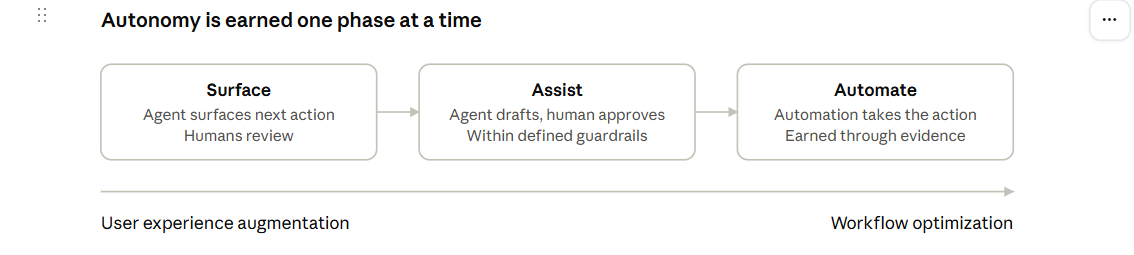
Each phase produces two things the next one needs: user trust and data about how the agent actually performs. That is why the order matters. Jumping straight to automation in a Tier 1 system skips the part where you learn what the agent gets wrong and users build confidence in it.
Step 3: Decide what agents will never touch
Regulatory requirements should shape the program before the first agent is created. Sit down with compliance, legal and risk and decide, explicitly, which parts of the system agents will never touch.
Your list will depend on your industry and your regulators, but the categories tend to be familiar: decisions that carry legal or regulatory liability, actions that cannot be reversed once taken, and anything where you must be able to explain the outcome to an auditor or a customer in plain terms. In most cases, the answer is "not by an agent."
Write these boundaries down and publish them. A visible list of red lines does three things at once. It gives builders clarity so they don't waste time on work that will never reach production. It recognizes the importance of the compliance and regulatory world for the team. And it protects user trust.
Step 4: Document and formalize the workflows
For the first phase of the phases, the agents need something to follow, and in most core applications, the real workflows are not written down anywhere reliable. They live in people's heads, in old training decks, in tickets and email threads, and in the habits of the people who have done the job for years.
This is a place where GenAI can give you a head start. Use it on the unstructured data you already have (tickets, emails, call notes and transcripts) to get drafts of the workflows. Stand up a retrieval-augmented (RAG) application over your procedural knowledge, such as manuals, runbooks and policy documents, so agents can use them for procedural decision-making. The users can also use this to interrogate how things are supposed to work and compare that to how they actually work.
Subject-matter experts then validate, correct and sharpen the initial workflows and the RAG applications. That pairing, machine speed on the first pass and human judgment on the final one, gets you to a formalized workflow far faster than blank-page workshops.
Once the workflows are documented, break each one into shared components and unique components. Shared components show up across many workflows: retrieving a record, summarizing a case history, checking a rule. Unique components belong to one workflow only. This split is the seed of reuse. Every shared component you identify now is something you will build once and use many times, instead of rebuilding it for each new use case.
Step 5: Lay out the capability placemat
Once you know your shared and unique components, put them all on one page. I call this the capability placemat, and I think of it as a layer cake with five layers.
- Layer 0: Platform primitives. The foundations every agent depends on.
- Layer 1: Reusable technical components. Technical building blocks built on those primitives.
- Layer 2: Reusable business components. Business capabilities that wrap the technical pieces into reusable steps.
- Layer 3: Reusable workflows. End-to-end flows assembled from the steps in Layer 2.
- Layer 4: Variations for specific business cases. The thin layer of difference that makes a workflow fit a particular line of business, product or region.
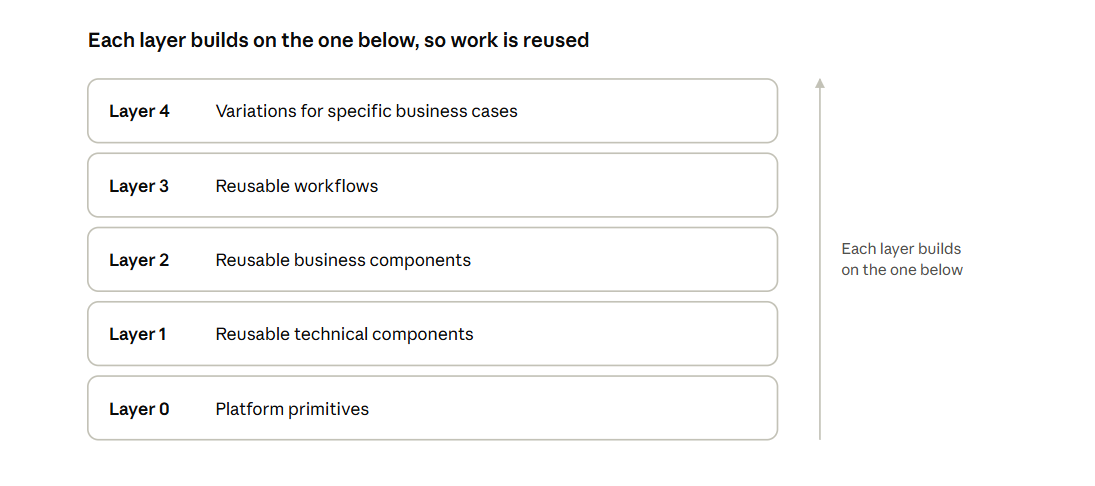 To make it concrete, and with the caveat that your cake will look different: Layer 0 might hold runtime specifics, logging frameworks, database requirements, memory requirements, tools requirements, etc. Layer 1 might hold MCP, tooling, logging, monitoring, access and identity management, state management, etc. Layer 2 might hold intake, processing, invoicing and accounting. Layer 3 might hold something like signing up a new customer, sending monthly bills, etc. Layer 4 would hold the variants of that flow, for example, signing up a new customer in Connecticut versus California.
Each layer builds on the one below it, and that is the point: reuse. The visual does a lot of work beyond reuse, too. It helps teams see the big picture, gives everyone a common language, makes prioritization calls easier (invest in the lower layers that unlock many things above them), and lets you show progress by marking what is built, what is in flight and what is next. If you find a lot of effort piling up in Layer 4, that is usually a sign that a shared component is missing lower down.
Step 6: Finalize the tech stack
Only now do I commit to a tech stack, and the placemat is what makes that decision tractable. Because you have laid out the platform primitives you need, you are choosing tools against a defined set of requirements rather than shopping for technology in search of a problem.
The goal is a stack that lets teams build Layer 1 and above without re-solving Layer 0 every time. That usually means favoring components that fit your security and identity model, give you observability into what agents are doing and why, and let you swap individual pieces as the landscape changes. The pace of change in this space is fast. A stack that locks you in on day one will be a constraint by year two.
Once the stack is final, build out the platform primitives first. They are the least visible work in the program and the most important, because everything above them inherits their quality.
Step 7: Upskill both business and technology
The technology will move faster than the organization unless you invest in people, and that investment has to reach both sides of the house.
Product owners need training in particular, because the nature of the work changes. A lot of what used to be active coding becomes prompt management: writing, versioning, reviewing and testing the instructions and knowledge sources that shape agent behavior. Prompts, retrieval sources and evaluation criteria become product artifacts. The product owner who understands them can steer the system directly instead of translating every change into a ticket for engineering.
Engineers need to learn the patterns that are new to them: agent design, guardrails, evaluation and how to debug a system whose behavior is probabilistic. Business subject-matter experts need to learn how to give feedback that actually improves the agent, rather than feedback that merely says it was wrong.
Treat this as a standing program rather than a one-time class. The people closest to the work are your best source of quality, and they can only contribute if they share the vocabulary.
Step 8: Plan adoption, evals and success metrics
An agent that nobody uses, or that nobody can prove is accurate, is a waste of time. Plan for adoption and measurement together, and build the evaluation platform as you scale.
I look at three families of metrics:
- User adoption. Who is using the capability, how often, and, just as important, who tried it and stopped. Drop-off tells you where trust is breaking.
- LLM as a judge/human evals. Using a model to grade outputs against defined criteria lets you evaluate at a volume no human review team could match. Calibrate the judge against human reviewers regularly so you know whether to trust its scores.
- Accuracy. Measure outputs against known-good answers, using curated test sets built with your subject-matter experts. In a Tier 1 system, this is the measure that decides whether a capability moves forward.
These metrics do more than report on the program. They are the gates between phases. An agent moves from Surface to Assist, and from Assist to Automate, because the evidence says it is ready, not because a date on a plan arrived.
Step 9: Communicate constantly
Programs like this are long and drawn out. They will run over years, and in that time sponsors change, priorities shift and skepticism comes and goes. Keeping stakeholders involved in the journey is as important as any technical decision.
Create a communication plan up front. Decide who needs to hear what, how often, and through which channel. Use the capability placemat as a shared status view so leaders can see progress in a form they understand. Share quick wins, but also share what did not work and what you learned, because credibility on the hard days is built by honesty on the easy ones. Bring risk, compliance and legal partners along as active participants rather than as audiences. And make sure the end users hear about changes from you before they experience them.
Closing thoughts
Taking a Tier 1 application into the agentic era is not a single project. It is a program that has to balance quick wins against long-term strategy, ambition against a very low tolerance for failure, and speed against the trust of the people who depend on the system.
The approach that works, in my experience, is deliberately unglamorous: align on strategy, move in phases from Surface to Assist to Automate, draw the red lines early, formalize the workflows, build reusable layers, invest in people, measure honestly and keep everyone informed. None of those steps is exotic. Doing all of them, in order, is what separates a program that succeeds from one that doesn't.
If you are starting this journey, begin with the conversation about strategy and boundaries. Everything else gets easier once that is settled.
Conversation
Loading…